Web & TCP apps
Some internal applications (dashboards, APIs, admin UIs) are published through Teleport as apps. You reach them with the same login and short-lived cert as everything else — no VPN, no separate password, no API key. If an app isn’t listed for you, you don’t have access yet — ask an admin to grant it.
There are two ways to open an app, both shown below in Teleport Connect.
Browse to it under All Resources (filter by the Application type or
by label); each web app row has a Launch button and a Set up
connection menu. (TCP apps show Connect instead — see the note at
the end of this page.)

1. Option 1 — open it in the browser (Launch)
Click Launch. Teleport opens the app at its public address (e.g.
https://ekarton-staging.teleport.better.care) in your browser, already
authenticated. This is the quickest way to use a web UI.
CLI equivalent — print the URL and open it:
tsh apps login ekarton-staging
# then open the printed https://... address in your browser
2. Option 2 — local port for curl / Bruno (Set up connection)
When you want to hit the app from an API client — curl, Bruno,
Postman, a script — open a local connection instead. Click the ⋮
menu on the app row → Set up connection. Teleport Connect opens an
authenticated tunnel and gives you a http://localhost:<port>; address:
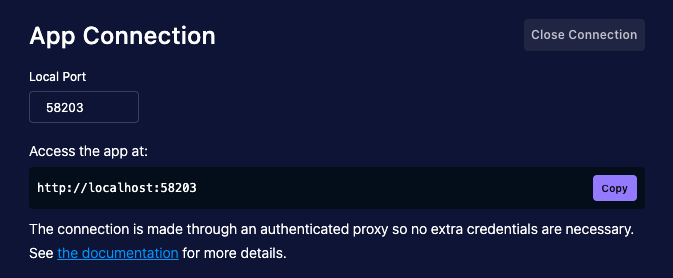
Point your client at that address. No extra credentials are necessary — the connection runs through an authenticated proxy, so your Teleport identity is already attached:
# Teleport Connect printed e.g. http://localhost:58203
curl http://localhost:58203/health
In Bruno (or Postman/Insomnia), set the request base URL to the same
http://localhost:<port>; — no auth header, token, or client cert to
configure. The port stays open until you click Close Connection.
CLI equivalent — same authenticated local listener, without the GUI:
tsh proxy app ekarton-staging
# prints: Proxying connections to ekarton-staging on 127.0.0.1:<port>
# then, in another shell:
curl http://127.0.0.1:<port>/health|
Launch (Option 1) is for interactive web UIs; Set up connection /
|
|
TCP apps (e.g. the Oracle and SQL Server tunnels) have no Launch. Their button is Connect, and it offers two paths:
The database-specific walkthroughs are in Databases. |