How this documentation works
This content is intended for all Studio users.
This documentation is structured as a progressive journey starting with foundational concepts and building towards advanced configuration and deployment. You do not need to read everything in order, but if you are new to Studio, we recommend following the sections from start to finish.
| Section | What will you find here |
|---|---|
| Welcome | Introduction, setup, glossary, resources |
| Start here | Step-by-step guide to your first form |
| Build in Studio | Form builder from the ground up |
| Connect in Studio | ETL, AQL builder basics and advanced queries |
| Marketplace | Validated clinical content use, variables, connectors, bundles, widgets |
| Test and deploy | Preview, saving, activation, Form renderer, Form playground in depth |
| Advanced Studio | Scripts, customisations, frameworks, security, localisation |
| Release notes | What is new, version history |
AI support with DocGPT
Every page in this documentation is compatible with DocGPT, our AI assistant built into Better Studio's knowledge base. You can ask DocGPT questions in plain language so it can search across the documentation to find the most relevant answer. Look for DocGPT button in the top navigation.
A couple of considerations when using the AI search:
- Make your queries clear and specific: Clearly state what you need. The more specific you are, the better the response will be.
- Provide context: Provide background information or context if it will help clarify the request.
- Ask open-ended questions: Encourage detailed responses by asking open-ended questions.
- Be concise: Keep your prompts concise and to the point to avoid confusion.
- Avoid ambiguity: Avoid vague terms that could be interpreted in multiple ways.
- Use correct terminology: Use accurate and appropriate terminology relevant to your topic.
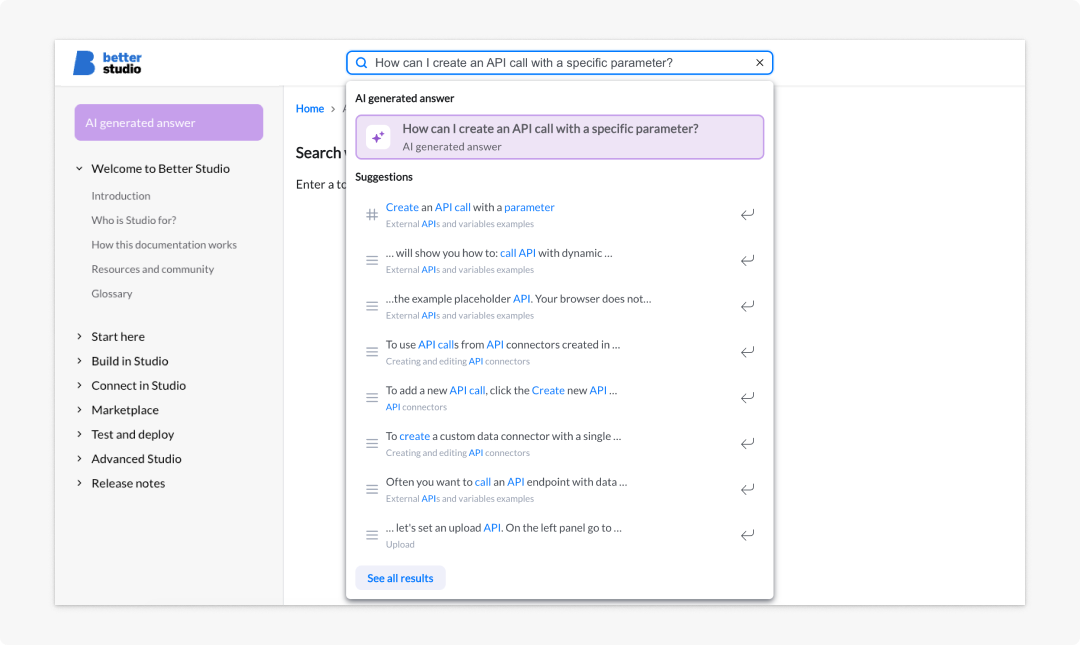
Examples of questions you may want to ask when searching for answers within the documentation:
- How can I add a project to Studio?
- How can I use dependencies in a form?
- How can I create an API call with a specific parameter?
- What's the best form component if I need to create an image map?