Form builder
This content is intended for all Studio users.
Form builder is Better Studio's primary tool for designing clinical forms. It provides a low-code, drag-and-drop environment where you can create forms from scratch, bind them to openEHR templates, add logic and interactivity, and preview the result — all without writing code for most tasks.
This section covers everything you need to build forms in Studio, from placing your first field to configuring advanced scripting behaviour.
What is Form builder?
Form builder gives you two main screens to work with:
- Editor screen: The main canvas where you build and edit forms. You select components from the left panel and drag them onto the canvas, then configure them using the property panel on the right.
- Preview screen: A testing view where you can see how your form renders on desktop, tablet, and mobile; enter test data; and validate interactions between fields.
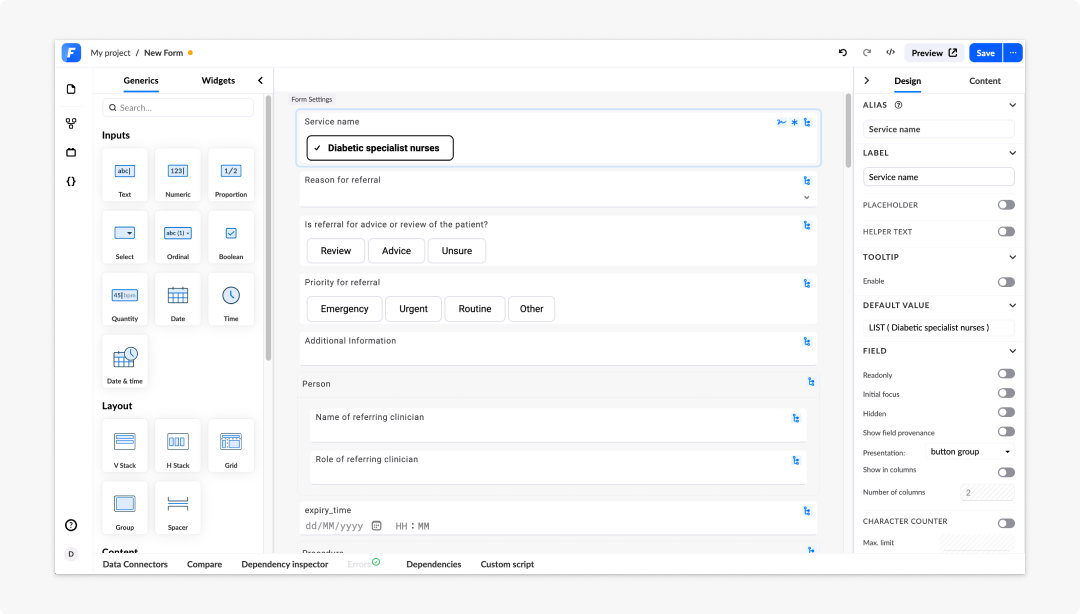
What can you build
Form builder supports the creation of:
- Clinical data entry forms
- Multi-page assessments
- Summary views and read-only displays
- Forms with conditional logic and dynamic behaviour
- Localised forms for multi-language deployments
Using ad blocker might cause problems when saving a form (incorrect username, missing comment), saving summaries, and when using AQL builder.
Frequently asked questions (FAQs)
What is the difference between the Editor screen and Preview screen?
The Editor screen is the canvas where you build and configure your form. The Preview screen lets you test how the form renders and behaves before activation.
Can I export a form from Form builder?
Yes. From the Select screen, you can export forms for use in other projects or environments.
What types of forms can I build in Form builder?
Form builder supports clinical data entry forms, multi-page assessments, summary and read-only views, forms with conditional logic, configured widgets, and localised forms for multi-language deployments.