Better Studio 3.15 Release notes
3.15.0 (21.4.2026)
Better Studio 3.15 is one of our most substantial releases. It introduces a brand-new data integration tool, a redesigned navigation, two-factor authentication, a new BDS-based rendering engine, grid layout in Form builder, and a completely rebuilt documentation site.
Better Studio 3.15.0 is compatible with Form Renderer version 3.15.0
Table of Content:
Studio
ETL: A new Studio tool
Better Studio 3.15 introduces ETL (extract, transform, load) as a dedicated tool within Studio. ETL enables you to define and run data pipeline configurations: Connecting a source, applying transformation rules, and loading the output to a target — without leaving your Studio project environment.
ETL is particularly useful in clinical workflows where data needs to be moved between systems. A team building a post-discharge monitoring application can use ETL to extract patient observations stored in an openEHR CDR, transform the data into a flat structure suitable for a BI tool or reporting dashboard, and load it to the target system. This is now all configured within the same environment where Studio forms are built and managed.
Your existing project connections and authorisation settings carry over automatically, so there is no need to reconfigure server access. Phase 1 covers the core pipeline workflow. Further ETL capabilities will follow in upcoming releases.
To get started with ETL, see the ETL documentation.
Navigation redesign
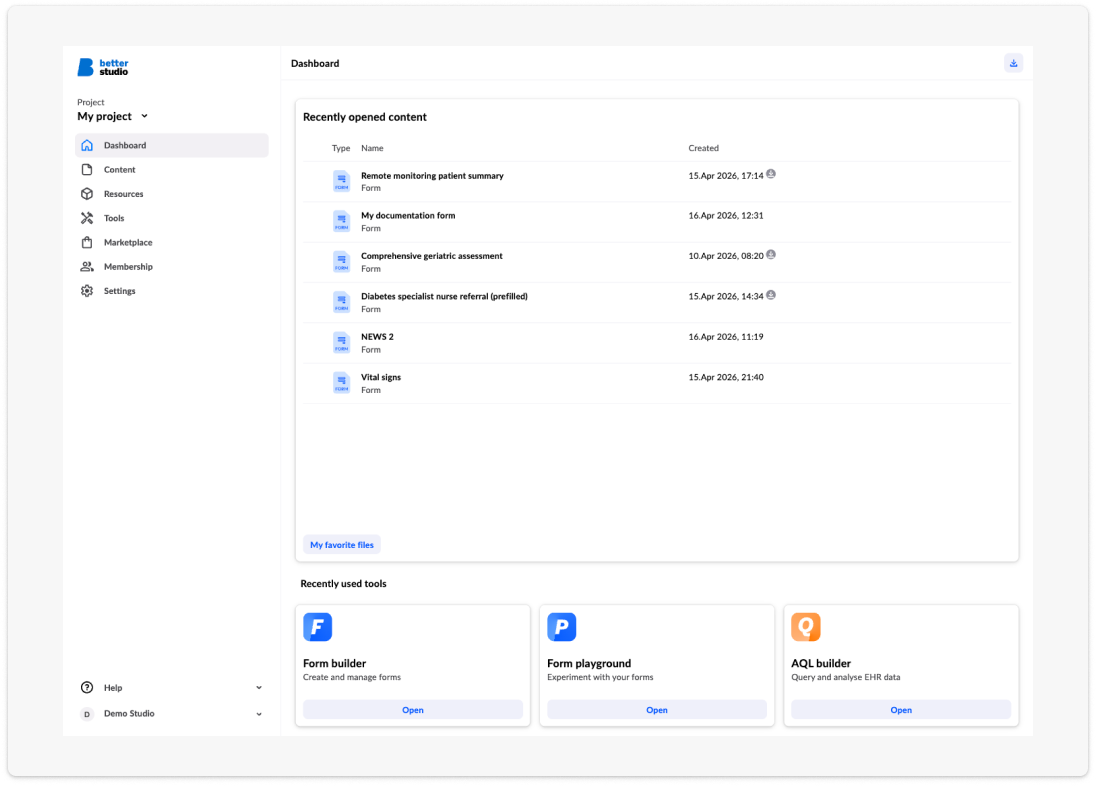
The Studio interface has been updated with a restructured navigation. As the range of tools in Studio has grown (Form builder, AQL builder, ETL, Marketplace, Form playground, and more to come), the previous navigation structure made context-switching between tools cumbersome, particularly for users working across multiple areas of the same project.
The new layout gives you faster access to the tools you use most, reduces the number of steps needed to move between sections, and aligns the interface with the Better Design System (BDS). All existing keyboard shortcuts are preserved.
Two-factor authentication
Studio 3.15 adds support for two-factor authentication (2FA). Three authenticator apps are supported, making setup straightforward across different devices and preferences.
2FA addresses a real risk in healthcare application development: A compromised Studio account can expose access to connected EHR servers, patient data configurations, and project settings. For organisations operating under NHS Digital standards, GDPR, or similar information governance frameworks, 2FA support removes a compliance gap that previously required workarounds.
Enabling 2FA: Users will be prompted to configure their 2FA upon the first login, following the 3.15 update.
For step-by-step setup instructions, see the 2FA setup guide.
Form builder
Grid layout option
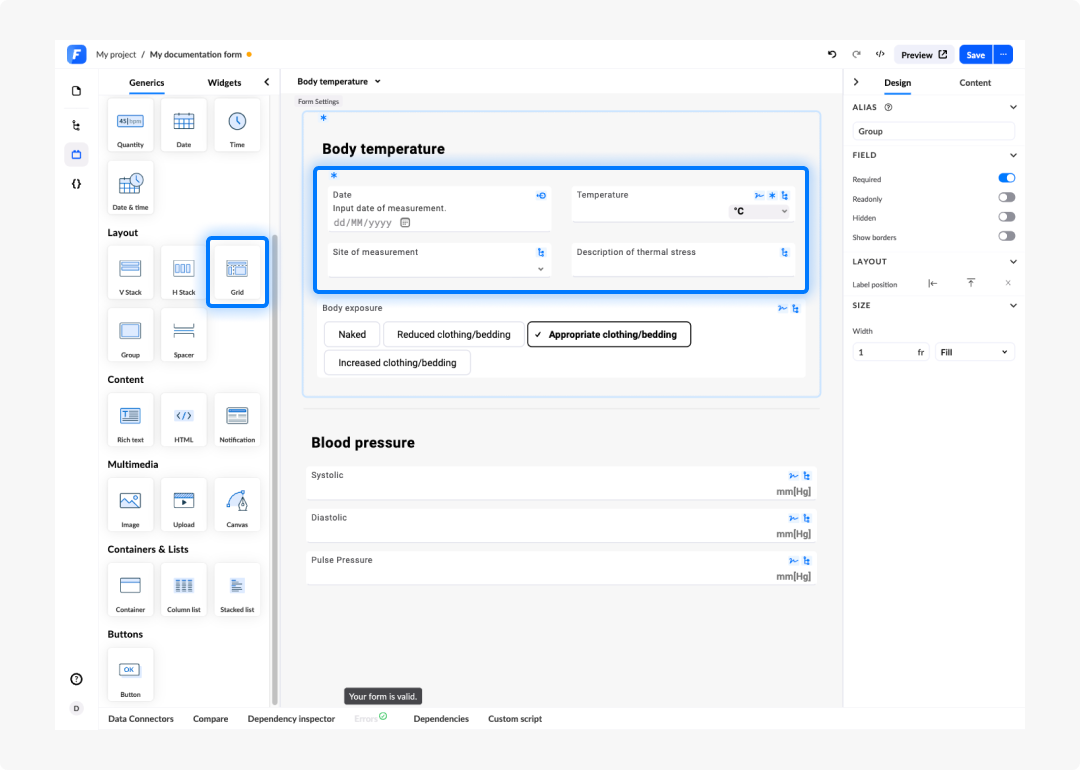
Form builder now includes a grid layout option for arranging fields on the form canvas, alongside the existing V Stack and H Stack layout elements.
The grid layout gives you direct control over how fields are positioned in a multi-column structure, with responsive behaviour across screen sizes handled automatically. This is particularly useful for clinical forms where related fields need to appear side by side. Examples can range from displaying peak flow, oxygen saturation, respiratory rate in a compact row on a respiratory assessment form, to presenting a set of demographic fields in a two-column layout that remains readable on both desktop and tablet.
Previously, achieving this kind of layout required custom CSS applied outside the low-code environment. The grid option makes it available directly from the container settings panel without additional styling work.
Form renderer
BDS renderer
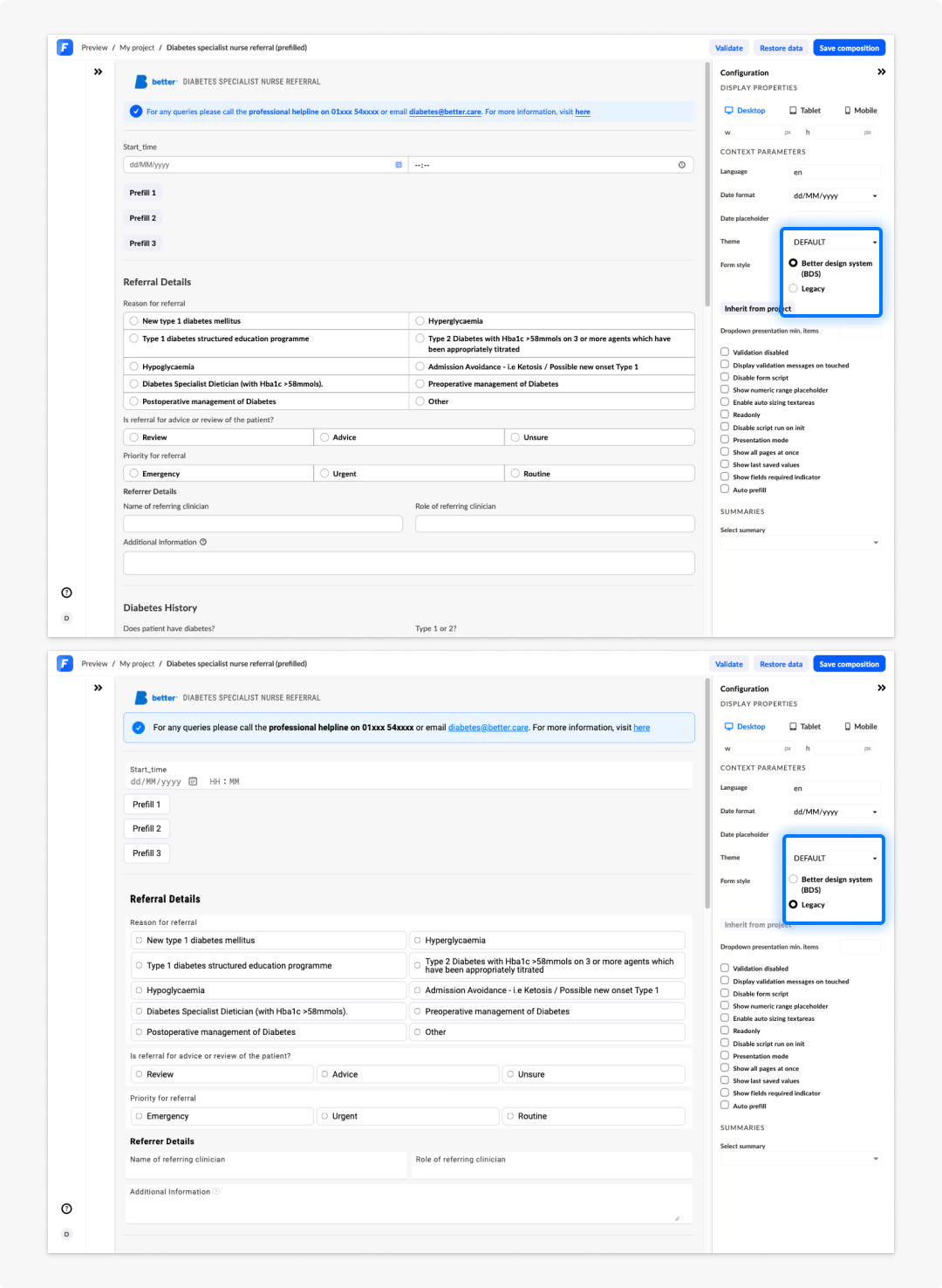
Form renderer 3.15 replaces the previous MRD-based input components with Better Design System (BDS) components across all field types. This affects every newly created rendered form in Studio.
The following input types have been migrated to BDS: text fields, coded text, date and date/time, boolean, quantity, duration, button groups, checkboxes, radio buttons, comboboxes, column lists, rich text, multimedia, and interactive image fields.
What this means in practice:
- Form inputs now share a consistent visual language and spacing across all field types.
- The clinical theme renders correctly and consistently, including in column lists and nested containers.
- Accessibility is improved across all inputs.
- Compact mode is now available for column lists.
- Spacer and divider elements are supported.
- Provenance display is supported on new fields.
You can see the difference of how a form will render between BDS and Legacy views in Form builder Preview.
If your project uses custom themes or style overrides, review the BDS renderer migration notes before upgrading to 3.15. Some existing overrides may need to be updated.
Offline mode
Form renderer supports an offline operating mode for clinical deployments where network connectivity cannot be guaranteed, for example point-of-care environments, field clinics, or applications that must continue functioning during intermittent outages.
Offline mode allows Form renderer to operate without a live connection to the EHR server. Instead of making direct HTTP calls, Form renderer delegates all resource requests to the host application via a typed request handler function that you register.
Documentation
The Better Studio documentation site has been completely rebuilt. The new site replaces the previous knowledge base and covers the full Studio toolset: Form builder in Build for Studio, AQL builder and ETL in Connect in Studio, Preview and Form playground in Test and go live, Advanced settings, Marketplace, and a beginner journey step-by-step guide in Start here. All Studio information has now a a consistent page structure, clearer navigation, FAQs, and improved search.
AI-assisted answers are available throughout, with improved response quality and the ability to regenerate or copy answers directly from the interface.
The documentation is live at docs.better.care/studio.
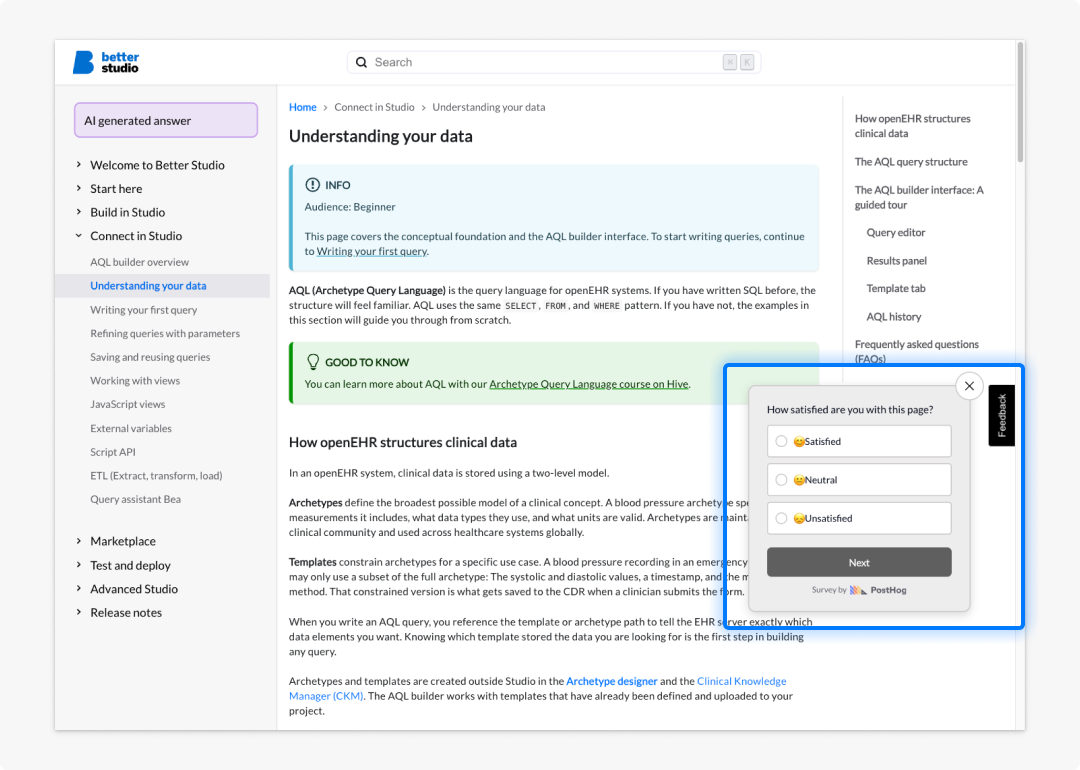
We want to continuously improve our documentation and user support, so any feedback is welcome. Navigate to the page or content you want us to improve and provide anonymous feedback there:
Bug fixes & improvements
Studio
- Fixed an issue where the project list reordered unexpectedly when selecting a project.
Form builder
- Fixed the default values panel closing unexpectedly when setting values for multiplicity containers with DV_QUANTITY fields.
- Fixed an issue where DV_DURATION fields imported from an .opt file were not shown on the form.
Form renderer
- Fixed setFieldValue script API function not handling nested containers that share the same archetype name.
- Fixed a duration field where setting a period string did not reflect the change in the UI.
- Fixed getFieldModel returning only the first model when a tag was used on a multiplicity field.
- Fixed column list not functioning when the renderer was embedded in a modal window.
- Fixed interactive image field not displaying correctly in forms using BDS themes.
- Fixed item alignment issues when using stack layout containers with BDS elements.
3.15.1 (23.04.2026)
Compatible with Form Renderer version 3.15.1
Form renderer
- Fixed an issue where full-width widgets did not correctly fill their container, appearing either narrower or wider than the available space
3.15.2 (06.05.2026)
Compatible with Form Renderer version 3.15.2
Bug Fixes & Improvements
Studio
- Fixed long file names not being truncated on file import in projects.
- Fixed an issue where editing a concept on a code system in the terminology editor did not work as expected.
- Fixed an issue where editing a user did not preserve all of their assigned user groups.
- Improved the add-to-project dialog to align with the latest design system.
- Restored the API list scrollbar in the global API editor.
Form Renderer
- Fixed offline renderer to correctly proxy asset requests for image maps on coded text fields.
3.15.3 (15.05.2026)
Compatible with Form Renderer version 3.15.3
Bug Fixes & Improvements
Studio
- Fixed dialog issues when duplicating forms.
- Fixed date time properties not showing in property panel
- Fixed wrong theme showing in summary with presentation
- Fixed issue with adding resource server with Basic auth
Form Renderer
- Fixed dropdowns not populating when Coded text is toggled to show
- Fixed interactive image responsiveness
3.15.4 (26.05.2026)
Compatible with Form Renderer version 3.15.4
Bug Fixes
Form Renderer
- Fixed issue where presentation value was recalculated based on timezone
- Fixed issue where default bds style font did not apply correctly
- Fixed checkbox, radio and button group column stacking on mobile devices
- BDS version updated to 2.1.5
3.15.5 (03.06.2026)
Compatible with Form Renderer version 3.15.5
Bug Fixes
Form Renderer
- Fixed combobox search issue when using data connectors in BDS style
- BDS version updated to 2.1.6
3.15.6 (06.07.2026)
Compatible with Form Renderer version 3.15.6
Bug Fixes
Studio
- Fixed an issue where the save button remained disabled after resolving a duplicate form name or version conflict.
Form builder
- Fixed an issue where the multimedia field did not display correctly in presentation mode.
Form Renderer
- Fixed missing icons in the EHR notification component.
3.15.8 (05.08.2026)
Compatible with Form Renderer version 3.15.8
Bug Fixes
Form builder
- Fixed an issue where the
openEHRAPI mode was not applied in the builder, preview, and playground contexts. - Added error display to the BDS interactive image field.
Form Renderer
- Fixed an issue where form prefill in
openEHRAPI mode failed when the server returned an unwrapped composition response. - Fixed an issue where retrieving a composition in
openEHRAPI mode used an incorrect request path. - Fixed an issue where saving a composition in
openEHRAPI mode could post to an invalid base URL.
3.15.7 (10.07.2026)
Compatible with Form Renderer version 3.15.7
Bug Fixes
Form Renderer
- Fixed an issue where a readonly field could incorrectly become editable when its parent container's readonly state changed.