Connect clinical data to your forms
This content is intended for beginner Studio users.
Forms in Better Studio do more than collect data points. They write structured clinical data to a connected repository.
In the previous step, you created a Vital signs form with the template fields.
In this step, you will see how those components fields are already connected to clinical data and how to verify that connection.
How data works in Studio
Better Studio connects forms to two types of clinical repositories:
- openEHR as the clinical data repository (CDR). This is where compositions are stored for data submitted with Studio forms, based on the openEHR standard for structured, reusable clinical data.
- FHIR as the operational data repository (ODR). Used for FHIR-based integrations (demographic data).
To store data, a form must be built on top of an openEHR template. A template defines the clinical data structure or specific data points, how are the organised, and how can they be recorded. Your form fields are then mapped to individual points within that structure.
How forms are connected to templates
When you add template fields to a form, Studio automatically links each field to its corresponding openEHR data path. The binding is built into the template structure itself.
This means your vital signs form fields (blood pressure with systolic and diastolic, body temperature with temperature and location of measurement, and other data points included in the template) are already connected to the correct data points in the openEHR repository. You do not need to map them manually.
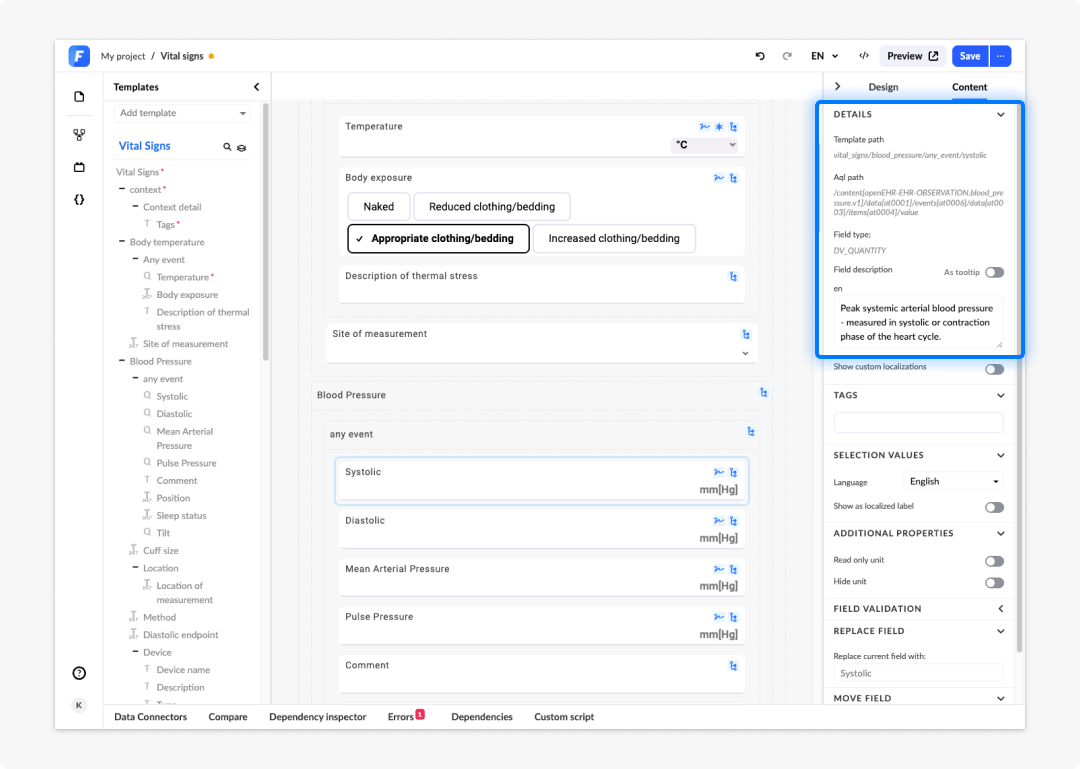
To verify the binding on any field:
- Click on a field on the canvas, for example Blood pressure --> Systolic.
- In the right-hand panel, click on the Content panel and check the Details.
- You will see the openEHR path that the field is bound to, for example something like vital_signs/vital_signs/blood_pressure/any_event/systolic.
Trial users: Your preset project already has a repository connected and includes example templates, including the Vital signs template. You do not need to configure anything before continuing. Licensed users: If you have a slightly different template available, this path may look different.
Frequently asked questions (FAQs)
What is an openEHR template and why does my form need one?
A template defines the clinical data structure for a form: The specific data points that can be recorded, how they are organised, and how they can be stored. A form must be built on top of an openEHR template in order to store data in the repository.
Do I need to manually map fields to data paths when using a template?
No. When you add template fields to a form, Studio automatically links each field to its corresponding openEHR data path. The binding is built into the template structure itself.
How do I verify that a field is correctly bound to a data path?
Click the field on the canvas, open the Content tab in the right-hand properties panel, and check the Details section. The openEHR path the field is bound to will be displayed there.