External variables
This content is intended for advanced Studio users.
External variables pass data into a form from a parent application at runtime. They are read-only within the form — the form cannot modify their values. Instead, the parent application sets the values and passes them to the Form Renderer as inputs when it initialises the form.
Since version 3.8, external variables are defined at the project level, making them available across all forms in the project without duplication.
How external variables fit into the variable model
Better Studio has three types of variables:
| Type | Defined by | Scope | Modifiable in a form |
|---|---|---|---|
| Internal | The form author | Single form | Yes, values can change during the session |
| External | The form author (project-level) | All forms in the project | No, values are passed in from the parent application |
| Static | Form renderer library | All forms | No, calculated automatically at runtime |
External variables are the bridge between your form and the application that hosts it. They carry contextual data (typically patient identifiers, server URLs, or authentication values) that the form needs but cannot generate itself.
Locked system variables
Studio defines three external variables automatically. They are present in every project and cannot be deleted, though you can set a test value for development and preview purposes:
| Variable | Description |
|---|---|
ehrId | The EHR ID of the patient the form is being opened for. Because passing the EHR ID is almost always required, this variable is integrated throughout the Form Renderer and is always present. |
terminologyUrl | The URL of the terminology adapter the form can use. |
openEhrUrl | The URL of the openEHR server the form can use. If the parent application does not pass a value, the Form Renderer assigns the openEHR server URL automatically. |
Locked variables are indicated by a lock icon in the External variables panel.
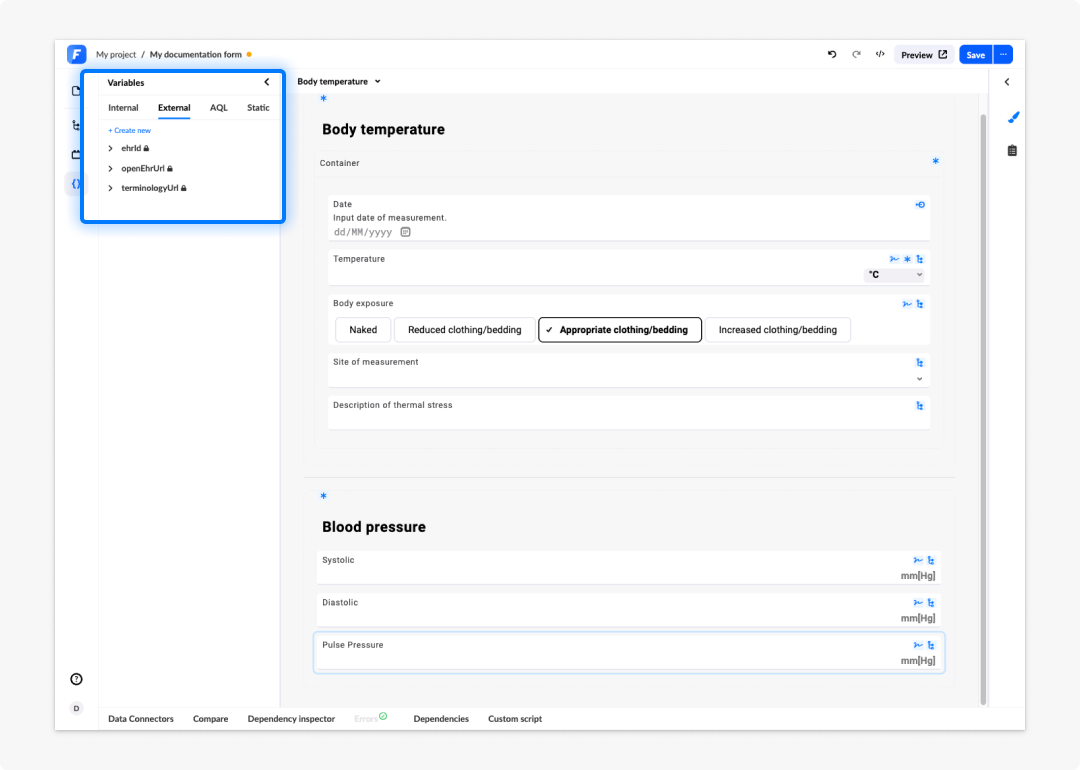
Creating external variables
To create an external variable:
- In Form builder, open the Variables panel from the left panel.
- Go to the External variables tab.
- Click Create new.
- Enter a name for the variable. Names must be unique within the project, at least three characters long, and contain only alphanumeric characters, hyphens, or underscores. The name cannot be aql.
- Select the variable type: string, number, array, object, or boolean.
- Optionally, enter a test value. The test value is used only when previewing the form in the builder. It is not used at runtime.
- For array or object types, optionally define a JSON schema to describe the structure. This makes the variable's content available for selection when building expressions.
External variables can be created in Form builder, but they must be deleted via the project Administration. Deletion is not available within Form builder.
Using external variables in queries and connectors
External variables are available anywhere in the form that accepts variable references, including AQL queries, data connector parameters, expressions, and dependency conditions.
In an AQL query or view, reference an external variable using the :variableName parameter notation. For example, to scope a query to the current patient:
SELECT o/data[at0001]/events[at0002]/data[at0003]/items[at0004]/value AS systolic
FROM EHR e
CONTAINS COMPOSITION c
CONTAINS OBSERVATION o[openEHR-EHR-OBSERVATION.blood_pressure.v2]
WHERE e/ehr_id/value = :ehrId
ORDER BY c/context/start_time/value DESC
LIMIT 1
Here :ehrId references the locked system variable ehrId. When the view is called at runtime, the Form Renderer passes the patient's EHR ID as the parameter value automatically.
Backward compatibility
Before version 3.8, external variables were scoped to individual forms. In version 3.8, they became project-level.
Forms built before version 3.8 remain editable and functional, but note the following if you open and edit one of these older forms:
- If you edit an external variable that does not yet exist globally in the project, that variable — along with any other form-local external variables not yet available globally — will be created at the project level.
- All globally defined external variables become available in the form when you open it.
- If the form contains a local external variable with the same name as a global external variable, the local variable takes precedence.
- If the form contains an internal variable with the same name as a global external variable, Form builder treats this as an error that must be resolved. You will need to rename or delete the conflicting variable.
We strongly suggest updating your forms and move to a supported version of Studio as soon as possible.
Frequently asked questions (FAQs)
What is an external variable?
An external variable is a read-only variable defined at the project level. Its value cannot be set within the form — instead, a parent application passes the value to the Form Renderer as an input at runtime. Once received, the variable is available to all forms in the project.
How do external variables differ from internal variables?
Internal variables are defined within a single form and can hold values that change during the form session. External variables are defined at the project level, are read-only within the form, and receive their values from the parent application at runtime.
Where do I create external variables?
In Form builder, in the Variables panel under the External variables tab. Note that deleting external variables must be done in the project Administration, not in Form builder.
What are the locked system variables?
Locked system variables are external variables defined by Studio itself: ehrId, terminologyUrl, and openEhrUrl. They cannot be deleted, but you can override their test value for development and preview purposes.
Is ehrId always available?
Yes. The ehrId variable is always present in every form. It is integrated into the Form renderer and used throughout the form structure to scope queries and data submissions to the correct EHR record.
What changed in version 3.8?
In version 3.8, external variables became project-level rather than form-level. This allows a variable defined once to be shared across all forms in the project, removing the need to duplicate variables across forms. We strongly urge you to upgrade and update your forms and Studio environment to a supported version.