Query assistant Bea
This content is intended for all Studio users.
Query assistant Bea is a chat panel in the AQL builder that helps you write, refine, and understand AQL or JavaScript queries using natural language. Describe the data you want to retrieve, and the assistant generates a query for you. You can also ask it to explain an existing query, suggest a fix for a broken one, or answer questions about AQL syntax and best practices.
Bea is AI-powered and can make mistakes. Always review and test any query it generates before connecting it to a form or application.
Opening Bea
To open and use Bea:
- In the AQL builder, locate the Bea AI in the AQL menu.
- Click on the button to open the chat panel.
- Type your request in the chat input and press Enter.
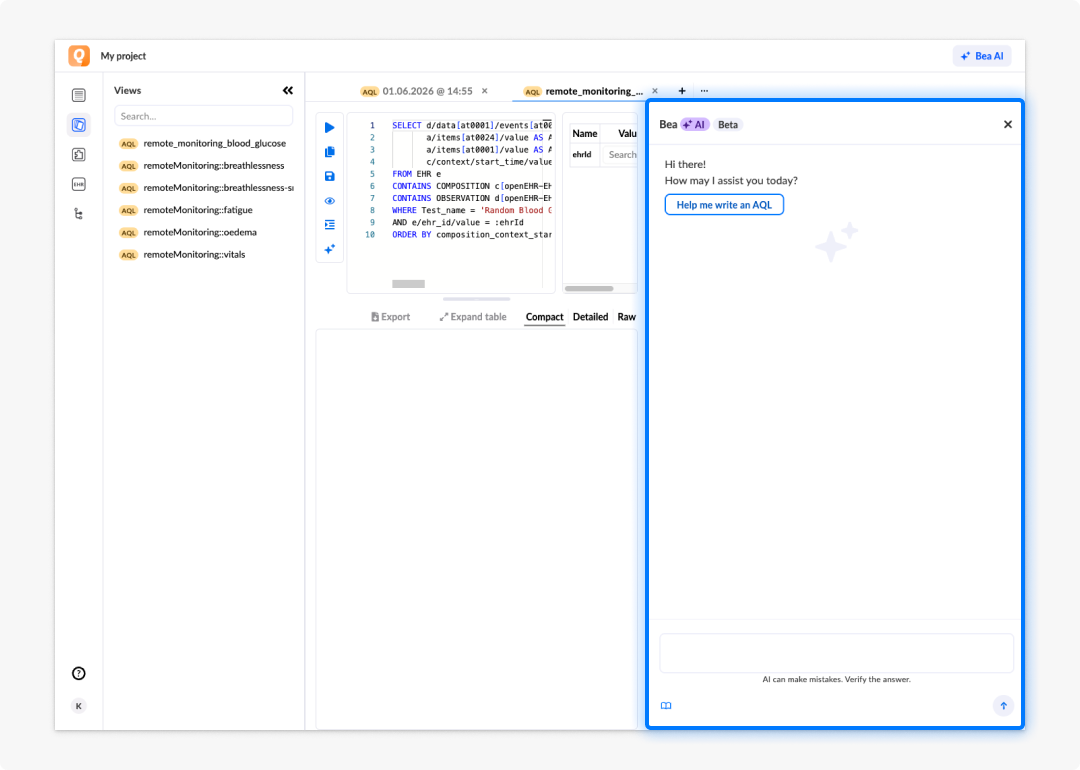
What Bea can help with
Our Bea can help you with:
- Generating queries: Describe the data you want and the assistant writes the AQL or JavaScript.
- Explaining queries: Paste a query and ask the assistant to explain what it does.
- Fixing errors: Share a broken query and describe the problem; the assistant suggests corrections.
- Answering syntax questions: Ask about AQL clauses, operators, or best practices.
- Handling complex, multi-query requests: When your request cannot be answered with a single AQL query, Bea generates multiple AQL queries and combines them into a JavaScript view, returning JavaScript code instead of plain AQL. See JavaScript views for how these work.
Writing effective prompts
The quality of the assistant's output depends on how clearly you describe your request. The following guidance helps you get better results:
Be specific about what data you need. Include the clinical concept, the data point, and any filtering conditions. For example: "Get the most recent systolic blood pressure for a patient, filtered by EHR ID."
Name the template or archetype if you know it. The more context you provide, the more precisely the assistant can construct the query path.
Specify the format if it matters. If you need results in a particular structure, for example a single value rather than a list, say so in the prompt.
Break complex requests down. If you need a query that combines multiple data sources, ask for one part at a time, then combine the results.
Ask follow-up questions. If the first result is not quite right, ask the assistant to adjust it. For example: "Add a LIMIT 1 to return only the most recent record" or "Rename the alias to match the field name I'm using in my form."
Use correct terminology. Terms like EHR ID, composition, archetype, observation, and template path help the assistant produce more accurate output.
Verifying generated queries
The Bea can generate queries that are syntactically valid but return incorrect or incomplete data. Before using a generated query in a form or application:
- Run the query in the AQL builder and review the results.
- Check that the returned paths and aliases match the template structure you are working with. Use the template browser to verify.
- Test against known patient data to confirm the results are accurate.
- Refine the query manually if needed before saving it as a view or connecting it to a data connector.
Frequently asked questions (FAQs)
What is the Query assistant Bea?
The Query assistant Bea is an AI-powered chat panel in the AQL builder. You describe what data you want to retrieve in natural language and the assistant generates an AQL query for you. It can also explain existing queries, suggest fixes, and answer questions about AQL syntax.
How do I open Bea?
In the AQL builder, toggle the AI icon in the AQL menu. This opens the chat panel.
Can Bea handle requests that need more than one AQL query?
Yes. When a request is too complex for a single AQL query, Bea can generate multiple AQL queries and combine them into a JavaScript view. In these cases the assistant returns JavaScript code instead of plain AQL. Review and test JavaScript view output the same way you would a standard query before using it.
Can I trust the queries Bea generates?
Not without verification. Bea can make mistakes — including generating syntactically valid queries that return incorrect or incomplete results. Always run generated queries, review the results, and test against known data before connecting a query to a form.
Is Bea useful for users who are new to AQL?
Yes. It is a good starting point if you are new to AQL or working with an unfamiliar template. Use it to generate a first draft, then review and refine using the template browser and the query results panel.
Can Bea help me fix a broken query?
Yes. Paste the query into the chat, describe the problem or the error, and the assistant will suggest corrections and explain the issue.