Best practices for complex forms
This content progresses from beginner to advanced user knowledge.
Building a simple form in Better Studio is straightforward. Building a large, multi-page clinical form that performs reliably, is easy to maintain, and handles real-world edge cases requires deliberate design decisions. This page covers the patterns and practices that make complex forms manageable.
Structuring large multi-page forms
Page strategy
Organise pages around clinical workflow stages, not template structure. A well-structured multi-page form maps to the mental model of the clinician completing it.
Recommended patterns:
| Pattern | When to use it |
|---|---|
| One domain per page | General assessments where each clinical area is independent (history, examination, plan) |
| One task per page | Guided workflows where each step must be completed before proceeding (triage, consent, referral) |
| Summary page last | Forms where a clinician needs to review all data before submission |
| Conditional pages | Pages shown only when a prior answer makes them relevant (e.g. a pregnancy history page shown only for female patients) |
Avoid creating pages solely to reduce scroll length. A page that contains only two or three fields adds navigation overhead without clinical benefit.
Navigation patterns
- Use dependencies to create navigation patterns for skipping pages that are not relevant based on earlier answers.
- Use dependencies to prevent forward navigation until a page is complete, where the clinical workflow requires it.
- Avoid disabling navigation entirely for long forms. Clinicians need to be able to review and correct earlier entries.
Dependency management at scale
Avoiding circular dependencies
A circular dependency occurs when the show/hide or value of Field A depends on Field B, and the show/hide or value of Field B depends on Field A, directly or through a chain of intermediate fields.
Rules to follow:
- When updating multiple fields from a single trigger, do all updates within the same listener callback.
- Draw a simple dependency map before writing scripts for forms with more than ten dependencies. Identify any fields that are both sources and targets.
Using tags to group dependency targets
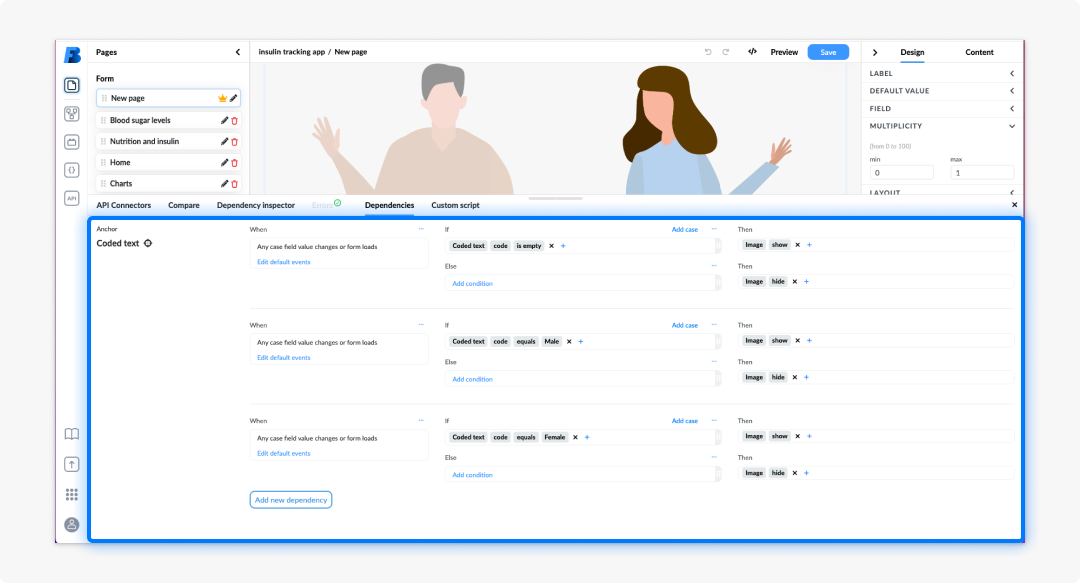
Tags let you apply a single rule to many fields at once. Instead of adding twenty fields as individual targets in a show/hide rule, tag them with a shared label (e.g. urgent-fields) and target the tag.
When to use tags:
- The same condition controls the visibility of many fields across different sections.
- The set of target fields is expected to grow as the form evolves.
- You want to manage related fields as a group without updating each dependency individually.
Performance considerations
Forms with many dependencies, particularly those referencing large data sets or running AQL queries on every value change — can become slow to evaluate. The following patterns reduce evaluation overhead.
Minimise cascading dependencies
Each value change triggers re-evaluation of all dependencies that reference the changed field. A form where changing one field triggers a cascade of fifty dependency evaluations will be noticeably slow on lower-powered devices.
Strategies:
- Consolidate multiple conditions into a single compound expression rather than creating many separate dependencies on the same source field.
- Use tags to group targets, which reduces the number of individual dependency rules the form must evaluate.
- Avoid referencing the same source field in both an Expression assistant value binding and a Script API listener. Choose one approach per field.
Using 'debounce' to optimize listeners on form elements and variables
A Listener sets up a function that will be called whenever the specified event is delivered to the form element, or triggered on a specified variable. Listeners can be added using the ScriptApi functions addListener and addVariableListener. it is a good practice to use debounce to optimize listeners.
Debounce limits the rate at which a function will be executed by specifying the amount of time in milliseconds that the listener should wait before processing a new event. This is useful for events that are triggered rapidly one after another, such as key presses. The example below shows the difference between using debounce and not using it. Without using debounce, the API is called on each key press, while with debounce, the API is called only after the user stops typing for 400ms, which makes the API calls more efficient.
Test on target devices
Performance issues that are not visible on a developer's workstation may be significant on a tablet or shared clinical workstation. Always test complex forms in Form playground on the device type that will be used in production.
Testing strategy for complex forms
Activate a complex form only after completing a structured test in Form playground. The following areas should be covered before activation.
Dependency conditions
| Test | Method |
|---|---|
| Show/hide rules fire correctly for expected values | Set source field to each expected value and confirm target visibility |
| Show/hide rules handle empty source fields | Clear the source field and confirm the target behaves as designed |
| Boundary conditions work as expected | Test values at the threshold (e.g. age = 17 vs 18 for an age gate) |
Value bindings and Script API listeners
| Test | Method |
|---|---|
| Calculated values populate correctly | Enter source field values and confirm calculated field output matches expected result |
| Calculated values update when source changes | Change a source field value and confirm the calculated field updates |
| Multi-field cascades set all fields correctly | Trigger the source field change and inspect all five (or more) target fields |
| Empty source fields are handled gracefully | Leave source fields empty and confirm no errors appear |
Validation and save hooks
| Test | Method |
|---|---|
| Views return results with populated data | Use a patient record with known data and confirm the view returns the expected results |
| Views handle empty result sets gracefully | Use a patient record with no relevant data and confirm the form does not error |
| Coded text options loaded from AQL are complete | Confirm all expected options appear in the dropdown |
App and dashboard creation
A Studio app is a configured collection of forms, dashboards, and navigation rules that presents a coherent clinical workflow. Dashboards combine widgets and AQL view results to display data without requiring the user to open individual forms.
Combining summaries, widgets, and AQL views
Summaries display structured read-only data from a composition. Widgets provide interactive or visual presentation layers. AQL views retrieve and aggregate data from across the EHR.
A well-designed dashboard uses all three in combination:
- Use AQL views to retrieve data (e.g. all observations in the last 30 days).
- Use widgets to provide visual representations (e.g. a trend chart, a body chart).
Navigation and linking
Forms within an app can pass context to each other via external variables. For example: Opening a referral form from a triage dashboard can pre-populate the patient identifier and triage category as external variables, so the clinician does not need to re-enter them.
Configure navigation rules in the app settings to define which form or dashboard opens when a user completes a workflow step.
Frequently asked questions (FAQs)
How many pages should a complex form have?
There is no fixed limit, but forms with more than ten pages become difficult to navigate and maintain. If your form is growing very large, consider splitting it into multiple forms linked via an external application or AQL view rather than adding more pages.
How should I decide what goes on each page?
Organise pages around clinical workflow stages or domains rather than around the structure of the underlying template. Some common examples would be: presenting complaint, clinical history, examination, and care planning. Each page should represent a coherent step that a clinician would recognise.
What is a circular dependency and how do I avoid it?
A circular dependency occurs when Field A depends on Field B and Field B also depends on Field A, directly or through a chain. Avoid them by ensuring each listener has a single clearly defined source field, and that no listener sets a field that is also a source for another listener in the same chain.
What are tags and when should I use them?
Tags let you group fields so that a single dependency rule targets all of them at once. Use tags when the same show/hide or enable/disable condition applies to many fields across different sections, or when the set of target fields is likely to grow as the form evolves.
My form feels slow when values change. What should I check first?
Start by reviewing how many dependencies reference the same source field. Each value change triggers re-evaluation of all of them. Also check whether any Script API listeners are calling executeAql or refreshData on every keystroke. Consolidating conditions and adding a debounce to AQL-triggering listeners are the most effective first steps.
Should I use the Expression assistant or the Script API for calculated fields?
Use the Expression assistant for straightforward value calculations that can be expressed declaratively. Common examples would be summing sub-scores or formatting a display label. Use the Script API when the calculation needs to respond to a specific event, involves conditional logic across many fields, or requires an AQL call to retrieve data before calculating.
What should I test in Playground before activating a complex form?
At a minimum: All dependency conditions with both expected and boundary-case values, all value bindings with empty and populated source fields, all Script API listeners including multi-field cascades, all pre-save hooks including blocking conditions, and all AQL views and data connectors with both populated and empty result sets.
What is the difference between a form and a dashboard in Studio?
A form is a data entry interface that writes to an openEHR composition. A dashboard is a read-only or mixed-mode interface that combines widgets and AQL view results to display patient or population data. Dashboards are built using the same tools as forms but are typically configured in display mode.